> ## Documentation Index
> Fetch the complete documentation index at: https://allhandsai-cookbook-sync.mintlify.site/llms.txt
> Use this file to discover all available pages before exploring further.
# OpenHands
> OpenHands LLM provider with access to state-of-the-art (SOTA) agentic coding models.
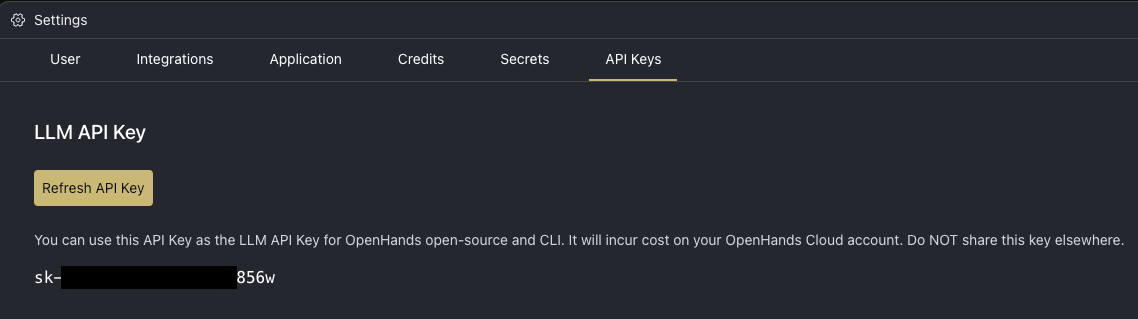
## Obtain Your OpenHands LLM API Key
1. [Log in to OpenHands Cloud](/openhands/usage/cloud/openhands-cloud).
2. Go to the Settings page and navigate to the `API Keys` tab.
3. Copy your `LLM API Key`.
 ## Configuration
When running OpenHands, you'll need to set the following in the OpenHands UI through the Settings under the `LLM` tab:
* `LLM Provider` to `OpenHands`
* `LLM Model` to the model you will be using (e.g. claude-sonnet-4-20250514 or claude-sonnet-4-5-20250929)
* `API Key` to your OpenHands LLM API key copied from above
## Using OpenHands LLM Provider in the CLI
1. [Run OpenHands CLI](/openhands/usage/cli/quick-start).
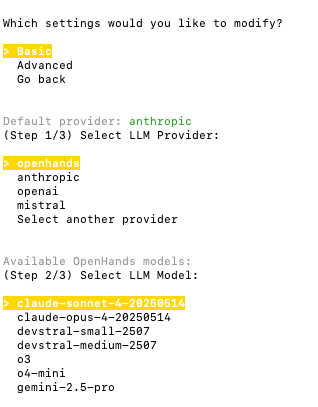
2. To select OpenHands as the LLM provider:
* If this is your first time running the CLI, choose `openhands` and then select the model that you would like to use.
* If you have previously run the CLI, run the `/settings` command and select to modify the `Basic` settings. Then
choose `openhands` and finally the model.
## Configuration
When running OpenHands, you'll need to set the following in the OpenHands UI through the Settings under the `LLM` tab:
* `LLM Provider` to `OpenHands`
* `LLM Model` to the model you will be using (e.g. claude-sonnet-4-20250514 or claude-sonnet-4-5-20250929)
* `API Key` to your OpenHands LLM API key copied from above
## Using OpenHands LLM Provider in the CLI
1. [Run OpenHands CLI](/openhands/usage/cli/quick-start).
2. To select OpenHands as the LLM provider:
* If this is your first time running the CLI, choose `openhands` and then select the model that you would like to use.
* If you have previously run the CLI, run the `/settings` command and select to modify the `Basic` settings. Then
choose `openhands` and finally the model.
 When you use OpenHands as an LLM provider in the CLI, we may collect minimal usage metadata and send it to All Hands AI. For details, see our Privacy Policy: [https://openhands.dev/privacy](https://openhands.dev/privacy)
## Using OpenHands LLM Provider with the SDK
You can use your OpenHands LLM API key with the [OpenHands SDK](https://docs.openhands.dev/sdk) to build custom agents and automation pipelines.
### Configuration
The SDK automatically configures the correct API endpoint when you use the `openhands/` model prefix. Simply set two environment variables:
```bash theme={null}
export LLM_API_KEY="your-openhands-api-key"
export LLM_MODEL="openhands/claude-sonnet-4-20250514"
```
**The SDK uses the OpenHands LLM Key not the OpenHands Cloud API Keys** : If you see the following error ensure you are using the [OpenHands LLM Key](https://app.all-hands.dev/settings/api-keys).
```bash theme={null}
Unable to find token in cache or `LiteLLM_VerificationTokenTable`
```
OpenHands Cloud API Keys work with the [Cloud API](https://docs.openhands.dev/openhands/usage/cloud/cloud-api), while OpenHands LLM API Keys work with your chosen LLM via the OpenHands provider.
### Example
```python theme={null}
from openhands.sdk import LLM
# The openhands/ prefix auto-configures the base URL
llm = LLM.load_from_env()
# Or configure directly
llm = LLM(
model="openhands/claude-sonnet-4-20250514",
api_key="your-openhands-api-key",
)
```
The `openhands/` prefix tells the SDK to automatically route requests to the OpenHands LLM proxy—no need to manually set a base URL.
### Available Models
When using the SDK, prefix any model from the pricing table below with `openhands/`:
* `openhands/claude-sonnet-4-20250514`
* `openhands/claude-sonnet-4-5-20250929`
* `openhands/claude-opus-4-20250514`
* `openhands/gpt-5-2025-08-07`
* etc.
If your network has firewall restrictions, ensure the `all-hands.dev` domain is allowed. The SDK connects to `llm-proxy.app.all-hands.dev`.
## Pricing
Pricing follows official API provider rates. Below are the current pricing details for OpenHands models:
| Model | Input Cost (per 1M tokens) | Cached Input Cost (per 1M tokens) | Output Cost (per 1M tokens) | Max Input Tokens | Max Output Tokens |
| - | - | - | - | - | - |
| claude-sonnet-4-5-20250929 | \$3.00 | \$0.30 | \$15.00 | 200,000 | 64,000 |
| claude-sonnet-4-20250514 | \$3.00 | \$0.30 | \$15.00 | 1,000,000 | 64,000 |
| claude-opus-4-20250514 | \$15.00 | \$1.50 | \$75.00 | 200,000 | 32,000 |
| claude-opus-4-1-20250805 | \$15.00 | \$1.50 | \$75.00 | 200,000 | 32,000 |
| claude-haiku-4-5-20251001 | \$1.00 | \$0.10 | \$5.00 | 200,000 | 64,000 |
| gpt-5-codex | \$1.25 | \$0.125 | \$10.00 | 272,000 | 128,000 |
| gpt-5-2025-08-07 | \$1.25 | \$0.125 | \$10.00 | 272,000 | 128,000 |
| gpt-5-mini-2025-08-07 | \$0.25 | \$0.025 | \$2.00 | 272,000 | 128,000 |
| devstral-medium-2507 | \$0.40 | N/A | \$2.00 | 128,000 | 128,000 |
| devstral-small-2507 | \$0.10 | N/A | \$0.30 | 128,000 | 128,000 |
| o3 | \$2.00 | \$0.50 | \$8.00 | 200,000 | 100,000 |
| o4-mini | \$1.10 | \$0.275 | \$4.40 | 200,000 | 100,000 |
| gemini-3-pro-preview | \$2.00 | \$0.20 | \$12.00 | 1,048,576 | 65,535 |
| kimi-k2-0711-preview | \$0.60 | \$0.15 | \$2.50 | 131,072 | 131,072 |
| qwen3-coder-480b | \$0.40 | N/A | \$1.60 | N/A | N/A |
**Note:** Prices listed reflect provider rates with no markup, sourced via LiteLLM’s model price database and provider pricing pages. Cached input tokens are charged at a reduced rate when the same content is reused across requests. Models that don't support prompt caching show "N/A" for cached input cost.
This documentation is built and hosted on [Mintlify](https://mintlify.com), a developer documentation platform.
When you use OpenHands as an LLM provider in the CLI, we may collect minimal usage metadata and send it to All Hands AI. For details, see our Privacy Policy: [https://openhands.dev/privacy](https://openhands.dev/privacy)
## Using OpenHands LLM Provider with the SDK
You can use your OpenHands LLM API key with the [OpenHands SDK](https://docs.openhands.dev/sdk) to build custom agents and automation pipelines.
### Configuration
The SDK automatically configures the correct API endpoint when you use the `openhands/` model prefix. Simply set two environment variables:
```bash theme={null}
export LLM_API_KEY="your-openhands-api-key"
export LLM_MODEL="openhands/claude-sonnet-4-20250514"
```
**The SDK uses the OpenHands LLM Key not the OpenHands Cloud API Keys** : If you see the following error ensure you are using the [OpenHands LLM Key](https://app.all-hands.dev/settings/api-keys).
```bash theme={null}
Unable to find token in cache or `LiteLLM_VerificationTokenTable`
```
OpenHands Cloud API Keys work with the [Cloud API](https://docs.openhands.dev/openhands/usage/cloud/cloud-api), while OpenHands LLM API Keys work with your chosen LLM via the OpenHands provider.
### Example
```python theme={null}
from openhands.sdk import LLM
# The openhands/ prefix auto-configures the base URL
llm = LLM.load_from_env()
# Or configure directly
llm = LLM(
model="openhands/claude-sonnet-4-20250514",
api_key="your-openhands-api-key",
)
```
The `openhands/` prefix tells the SDK to automatically route requests to the OpenHands LLM proxy—no need to manually set a base URL.
### Available Models
When using the SDK, prefix any model from the pricing table below with `openhands/`:
* `openhands/claude-sonnet-4-20250514`
* `openhands/claude-sonnet-4-5-20250929`
* `openhands/claude-opus-4-20250514`
* `openhands/gpt-5-2025-08-07`
* etc.
If your network has firewall restrictions, ensure the `all-hands.dev` domain is allowed. The SDK connects to `llm-proxy.app.all-hands.dev`.
## Pricing
Pricing follows official API provider rates. Below are the current pricing details for OpenHands models:
| Model | Input Cost (per 1M tokens) | Cached Input Cost (per 1M tokens) | Output Cost (per 1M tokens) | Max Input Tokens | Max Output Tokens |
| - | - | - | - | - | - |
| claude-sonnet-4-5-20250929 | \$3.00 | \$0.30 | \$15.00 | 200,000 | 64,000 |
| claude-sonnet-4-20250514 | \$3.00 | \$0.30 | \$15.00 | 1,000,000 | 64,000 |
| claude-opus-4-20250514 | \$15.00 | \$1.50 | \$75.00 | 200,000 | 32,000 |
| claude-opus-4-1-20250805 | \$15.00 | \$1.50 | \$75.00 | 200,000 | 32,000 |
| claude-haiku-4-5-20251001 | \$1.00 | \$0.10 | \$5.00 | 200,000 | 64,000 |
| gpt-5-codex | \$1.25 | \$0.125 | \$10.00 | 272,000 | 128,000 |
| gpt-5-2025-08-07 | \$1.25 | \$0.125 | \$10.00 | 272,000 | 128,000 |
| gpt-5-mini-2025-08-07 | \$0.25 | \$0.025 | \$2.00 | 272,000 | 128,000 |
| devstral-medium-2507 | \$0.40 | N/A | \$2.00 | 128,000 | 128,000 |
| devstral-small-2507 | \$0.10 | N/A | \$0.30 | 128,000 | 128,000 |
| o3 | \$2.00 | \$0.50 | \$8.00 | 200,000 | 100,000 |
| o4-mini | \$1.10 | \$0.275 | \$4.40 | 200,000 | 100,000 |
| gemini-3-pro-preview | \$2.00 | \$0.20 | \$12.00 | 1,048,576 | 65,535 |
| kimi-k2-0711-preview | \$0.60 | \$0.15 | \$2.50 | 131,072 | 131,072 |
| qwen3-coder-480b | \$0.40 | N/A | \$1.60 | N/A | N/A |
**Note:** Prices listed reflect provider rates with no markup, sourced via LiteLLM’s model price database and provider pricing pages. Cached input tokens are charged at a reduced rate when the same content is reused across requests. Models that don't support prompt caching show "N/A" for cached input cost.
This documentation is built and hosted on [Mintlify](https://mintlify.com), a developer documentation platform.